Thursday, December 2, 2010

Free Shapefile of Countries of the World


Free Shapefile of Countries of the World


Note: read also part 2 and part 3 of this blog.

I'm always surprised that it is hard to find a good shapefile with world countries. I need country vector data for Boost.Geometry sample data. There is some there but I want to have another set. I want to have it as WKT (Well-Known Text) and I can use a shapefile as input.

Asking Google for "free world map shapefile" you get:
  • aprs (1), with also a modified version
  • blue marble requires registration, but (probably) the same set can be downloaded from the next entry
  • brothersoft, serving blue marble data (2)
  • mapcruzin (leading to no countries but several interesting other shapefiles)
Via my company, Geodan, you can also download a worldmap, here (requiring mailing your contact information) (3)

Via free gis data, here, there is a hit on ESRI, leading to this site, leading to annual subscriptions etc.. I skipped this one.

Via similar terms ("countries") we also find:
  • mapping hacks, serving three world files (4)
  • actually originating from this site, which has a more actual version (5)
  • a file from openmap here, called cntry02 (6)
  • and finally (via "cntry08") we find ESRI data here (7)
I've downloaded these shapefiles. It gives me (file dates):
  1. is from 2002, modified in 2009 for Antarctica
  2. is from 1996
  3. is from 2003
  4. is from 2004
  5. is from 2008
  6. is from 2002
  7. is from 2008

The Netherlands
Let's first show my country, the Netherlands:
netherlands

All borders through each other look quite messy... But let's concentrate on the data.
Southern Flevoland, a polder, already existing since 1968, is still not there on maps from 1 (aprsworld, green) and 2 (blue marble, so blue). Of course it is present on the map of my company 3 (geodan, red), because Geodan of course takes care for its own country. Southern Flevoland is also present on all newer maps (5, pink, 6 orange, 7 gray). But on 5 and 6 it has a planned but not realized polder (Markerwaard) included. So best for the Netherlands are 3 and 7.

Of the five inhabited islands along the Waddenzee, 7 depicts only two. So here 3 is the best choice (of course, it is our country, and note that for the rest this is not a commercial talk)

For the whole world, 6 and 7 are quite similar in nearly all aspects

Uruguay
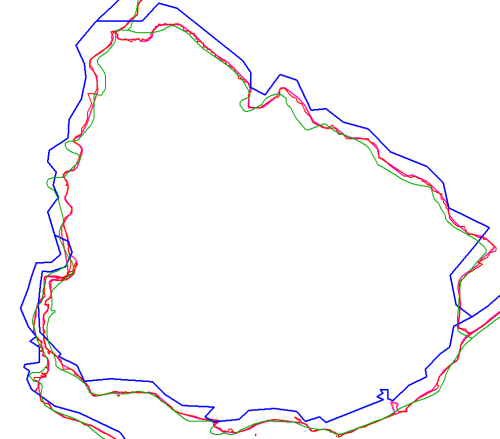
Let's now look at a country not part of Europe or US. I select Uruguay:
Uruguay

The blue vectors are quite rough and shifted to the west and north. Green lines are looking nice for a map on this scale, but deviate a bit from all other maps.

Let's now take a look in Google Earth. For this, we need to create a KML file...  hmm, shp2kml cannot be downloaded (blank website saying Missing ID). OK, we use PostGIS then, it can create KML and WKT (we need it below).

shp2pgsql -s4326 world.shp world1 > world1.sql

etc

So I created a database called blog and executed these SQL files.
Five minutes later (PostGIS is great) I do:
psql "-F " -A -n -t -q -Upostgres -dblog "-cselect '<Placemark>',ST_AsKml(the_geom),'</Placemark>' from world2 where name='Uruguay'" -otworld2.kml
 

Doing this for all tables and reworking the KML's  a bit (adding headers etc) gives me:
Uruguay with Google Maps

Considering Google Maps as our Single Point of Truth, we can discard the blue lines from Blue Marble, and might think that the green lines are also wrong. The rest is following the borders more or less but we need to zoom in to judge it better.

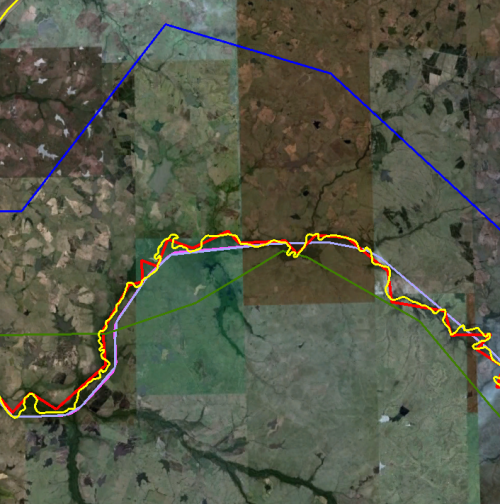
This is the new detail on a border:
Uruguay Google Detailed

The Yellow line is Google's line. The red line is following it, probably a bit too much. For a global scale, the other ones (4,5,6,7) are doing well here.

Caspian Sea
Looking at global level, we see immediately one thing, on which we zoom in here: it is surprising that the Caspian sea is not included in map 6 and 7. So the country borders are just across the sea... Not so good.
Caspian see

Not so good. So let's discard 6 and 7. We also see that the red lines (3) are too detailed, also here. Discard 3. Blue (2) and green (1) was already discarded before. So we keep 4 and 5, which are roughly the same. So I decide to keep the more actualy one: 5.

Decision
So we conclude, based on a few samples (and some more but not described here), that the file TM_WORLD_BORDERS-0.3.zip  from Thematic Mapping is the best shapefile to use for worldscale countries (even though it contains the Markerwaard).

Country number and validity
We did not consider attributes, and our research was still rough.

An important aspect we want to consider is geometric validity. And, even more important, the number of countries, it can differ over years, but the differences are sometimes still surprising.
Dataset Invalid (SQL Server) Invalid (PostGIS) #Countries Year
1 1 1 244 2002 / 2009
2 4 3 239 1996
3 34 5 253 2003
4 5 6 polygons 251 (3784 polygons (this dataset contains polygonsp; not multi-polygons) 2004
5 5 4 246 2008
6 3 0 251 2002
7 2 7 249 2008

About the countries themselves, I just glanced through the differences using a query, comparing ISO3 country codes, getting this table:
Compare 5 and 7

We see some inconsistent and some missing ISO codes, and some countries not in the one but in the other, and vice versa.


Conclusion

I think a good and free shapefile of the world is still  welcome.


Tuesday, November 16, 2010

Delphi TDateTimePicker with WeekNumber


This is not about C++ or C# or Geometry but about Delphi.

I used to have a TDateTimePicker in my app showing the week number. This trick is described on several places, e.g. here and (in Dutch) here

However, since Windows 7 (or probably since Windows Vista) this behaves differently, resulting in an ugly calendar where the right side is cut off :-(


The problem was that the actual control (SysMonthCal32) is, since Windows 7, put inside another control (DropDown), which has the same size as the month calendar. So you can enlarge the month calendar, but it only results in things not being displayed. So the parent control (DropDown) should be resized here...

Getting the parent is easy with Windows (GetParent), but it should still work using XP of course. So we check if the parent is really a "DropDown". There might be other ways to do it, but I'm using GetClassName now and that works.

So the adapted solution is here:


procedure TMyForm.BeginDateTimePickerDropDown(Sender: TObject);
const
  MCM_GETMAXTODAYWIDTH  = MCM_FIRST + 21;
var
  Style: LongInt;
  hDTP: THandle;
  r: TRect;
  intTodayWidth: Integer;

  cname: array[0..256] of Char;
begin
  //to get a handle of calendar
  hDTP := DateTime_GetMonthCal((sender as TDateTimePicker).Handle);

  //change a style
  Style := GetWindowLong(hDTP, GWL_STYLE);
  SetWindowLong(hDTP,  GWL_STYLE, Style or MCS_WEEKNUMBERS);

  //now we must change the width for calendar because week numbers shifted all strings
  //1. to get the required rect
  r := Rect(0, 0, 0, 0);
  SendMessage(hDTP, MCM_GETMINREQRECT, 0, Longint(@r));

  //2. to get the maximum width of the "today" string
  intTodayWidth := SendMessage(hDTP, MCM_GETMAXTODAYWIDTH, 0, 0);

  //3. adjust rect width to fit the "today" string
  if intTodayWidth > r.Right then
    r.Right := intTodayWidth;

  // For Win7, the window (class=SysMonthCal32) is automatically inside
  // a parent-window (class=DropDown). Check this. If so, take the parent window.
  // If not so (class=TMainForm), take this window (for XP and lower)
  GetClassName(GetParent(hDtp), cname, sizeof(cname));
  if AnsiSameText(cname, 'DropDown') then
  begin
    hDTP := GetParent(hDTP);

    // To get it perfect (on my machines) is adding this code:
    inc(r.Right, 6);
    inc(r.Bottom, 6);
  end;

  //4. to set new the height and width
  MoveWindow(hDTP, r.Left, r.Top, r.Right-r.Left, r.Bottom-r.Top, true);
end;


Tuesday, October 26, 2010

Union, Tangencies and Colors


Union, Tangencies and Colors

I like the picture below very much.


What you see here are, more or less, pink, green and blue. The colors are chosen as such that they always form distinct colors, regardless of how you combine them. There are of course other combinations with these properties, but... this is at least one of them.

When the pink layer is slightly moved to the right, you see better how the image is constructed:


The pink (transparent) layer is the union of the two underlying (multi-)polygons, the green one and the blue one. It has one hole, one kind of indentation and for the rest it is square. The underlying multi-polygons are better seen if the pink one is removed:


So this is clear: there are two multi-polygons here, complete with holes and self-tangencies. These multi-polygons have overlap in some places, no overlap in other places. They nearly fill the area, there are only three "boxes" free. The blue and green colors nicely mix into blue-green. The colors and transparencies are selected for that. SVG definitions are:

Green: style="fill-opacity:0.5;fill:rgb(153,204,0);stroke:rgb(153,204,0);stroke-width:3"

Blue: style="fill-opacity:0.3;fill:rgb(51,51,153);stroke:rgb(51,51,153);stroke-width:3"

I like this combination.

And with the pink style on top of it...

Pink: style="fill-opacity:0.2;stroke-opacity:0.4;fill:rgb(255,0,0);stroke:rgb(255,0,255);stroke-width:8"

...all colors change, however, they are still clearly distinct. Yellow-orange like for green+pink; lila for blue+pink; and brown for the blue+green+pink. So we have seven unique distinct colors now, which happens to be the ideal number of colors for a map.

By the way, this image is created using Boost.Geometry. Boost.Geometry can easily create SVG images. And Boost.Geometry can overlay multi-polygons (already possible for a long time) having all kinds of self-tangencies (new!). A self-tangency in a multi-polygon is a place where two polygon-members touch each other (orange dots in the map below), or where a polygon touches itself (the red dot in the map).


Actually... this could also be a polygon, having five interior rings (holes) which might be mutually tangent and tangent to they exterior ring.


OK, one more image...


Tuesday, October 19, 2010

Tag Dispatching and Inheritance

Tag Dispatching and Inheritance


In the previous blog we described Tag Dispatching by Type.

Though very convenient, when many classes (tagged by as many tags) share the same implementation, we get as many dispatch structs with the same implementation (or, better, forwarding to the same struct). This can be avoided by using similarities between classes, or between tags. In Boost.Geometry, for example, some geometries are single while others are multi. That multi-ness can be recognized by the metafunction is_multi which results in true for a multi-polygon and in false for a single polygon. We can include an IsMulti boolean template parameter in the dispatch structure, so that it is selected not only on tag dispatching, but also in is_multi.

This similarity can also be implemented using a tag hierarchy and inheritance.

Let's go back to the fruit example. All citrus fruit species have pulp vesicles. There are many citrus fruits species. And, of course, we don't want to repeat the dispatch structure has_vesicles so many times. So we try to define our tag hierarchy:

struct citrus_tag {};
struct pome_tag {};

struct apple_tag : pome_tag {};
struct pear_tag : pome_tag {};

struct
banana_tag {};

struct orange_tag : citrus_tag {};
struct lemon_tag : citrus_tag {};
struct lime_tag : citrus_tag {};

And then we couple the tags, like we did in previous blog:

template <typename T> struct tag {};
template <> struct tag<apple> { typedef apple_tag type; };
template <> struct tag<pear> { typedef pear_tag type; };
template <> struct tag<orange> { typedef orange_tag type; };
template <> struct tag<lime> { typedef lime_tag type; };
template <> struct tag<banana> { typedef banana_tag type; };

The new thing, besides the inheritance in the tags above, is that we now define a tag_cast metafunction:

template
<
    typename Tag, typename BaseTag,
    typename BT2 = void, typename BT3 = void, typename BT4 = void,
    typename BT5 = void, typename BT6 = void, typename BT7 = void
>
struct tag_cast
{
    typedef typename boost::mpl::if_
        <
          typename boost::is_base_of<BaseTag, Tag>::type,
          BaseTag,
          // Try next one in line:
          typename tag_cast<Tag, BT2, BT3, BT4, BT5, BT6, BT7, void>::type
        >::type type;
};

template <typename Tag>
struct tag_cast<Tag, void, void, void, void, void, void, void>
{
    // If not found, take specified tag, so do not cast
    typedef Tag type;
};

We can now check if a tag is a citrus tag, by calling defining a new tag as tag_cast<tag, citrus_tag>::type. This new tag is either a citrus tag, or it is the tag it already was.

And we can dispatch by this tag as well. So it looks like:

namespace dispatch
{
    template <typename T> struct has_vesicles : boost::false_type {};
    template <> struct has_vesicles<citrus_tag> : boost::true_type {};
}

template <typename Fruit>
std::string has_vesicles(Fruit const& fruit)
{
    // (Potentially) go up in hierachy: take tag corresponding to Fruit,
    // downcast to citrus_tag if possible
    typedef typename tag_cast<typename tag<Fruit>::type, citrus_tag>::type tag;

    return std::string("has vesicles: ")
        + (dispatch::has_vesicles<tag>::value ? "true" : "false");
}

This tag_cast, as proposed above, can not only cast to one base-class, but also to a range of base-classes. The definition
 typedef typename tag_cast<typename tag<Fruit>::type, citrus_tag, pome_tag>::type tag;
will result in a citrus_tag if it is a citrus, a pome_tag if it is a pome, and otherwise it results in the input tag. Besides this, it also walks through a tag hierarchy, so if citrus_tag and pome_tag were both derived from, e.g., a rosid_tag, and rosid_tag was specified in this call, it would result in a rosid_tag.

The sample program here shows two base classes, not listed here.

Our main program now displays correctly if the specific fruits have vesicles or not

int main()
{
    using namespace fruit;

    apple a("my apple");
    pear p("my pear");
    orange o("my orange");

    std::cout << has_vesicles(a) << std::endl;
    std::cout << has_vesicles(p) << std::endl;
    std::cout << has_vesicles(o) << std::endl;

    return 0;
}

Back to Boost.Geometry. Until now it is not done, but we might depricate the is_multi meta-function and replace it by this:

struct multi_tag;
struct multi_point_tag : multi_tag {};
struct multi_linestring_tag : multi_tag {};
struct multi_polygon_tag : multi_tag {};

And instead of calling is_multi, we call tag_cast<tag, multi_tag>. We then know if it is a multi and can dispatch on it. The same for linear. This will probably be very convenient, it has to be worked out a little more.


Casting and (multiple) inheritance
The tag_cast as implemented above casts to specified tags. We can not just call the parent-tag. One of the reasons for this is multiple inheritance.
Tag inheritance can be multiple. This is convenient because, of course, there can be different tag classifications for the same set of tags. For example: if a geometry contains segments, or is linear, or is areal. So we might get:

struct multi_tag;
struct multi_point_tag : multi_tag {};
struct multi_linestring_tag : multi_tag, linear_tag {};
struct multi_polygon_tag : multi_tag, areal_tag {};
When calling tag_cast, the results depends on the order of the specified base tags. And so does the dispatching.


Tag Dispatching by Type

Tag Dispatching by Type


Tag Dispatching (TD) is a Generic Programming (GP) technique for C++. It is well explained in this blog. Google Hit Number one (GH#1) is this site, where the example of the STL function advance is given. Tag Dispatching is not described a lot; GH#7 is from ggl (= Boost.Geometry), as is GH#8..

Nearly all TD descriptions I know of use the example of STL-advance. But in Boost.Geometry TD is done in another way: not by instance, but by type. The difference is explained in this blog.

Suppose you make a generic program doing something with fruit. An apple is normally being eaten differently than a banana or an orange. So if we program a generic function eat, giving it any type of fruit, it should redirect this to an implementation specific to that kind of fruit, so for apple differently than for a banana.

We first implement the tags. Tags are completely empty structures. But (of course) not completely useless.
struct apple_tag {};
struct banana_tag {};
struct orange_tag {};

We then create some sample implementations. Most properties are not used, it is just to show there are (sometimes completely) different classes which can be handled genericly.
struct apple
{
    double radius;

    std::string name;
    apple(std::string const& n) : name(n) {}
};

struct banana
{
    double length;

    std::string name;
    banana(std::string const& n) : name(n) {}
};


All this is quite simple C++ code, though you have to understand templates (generics) and specialization.

OK, now we implement Tag Dispatching by Instance:

namespace dispatch
{
    void eat(apple const& a, apple_tag)
    {
        std::cout << "bite" << std::endl;
    }

    void eat(banana const& b, banana_tag)
    {
        std::cout << "peel" << std::endl;
    }
}

template <typename T>
void eat(T const& fruit)
{
    typename tag<T>::type the_tag;
    dispatch::eat(fruit, the_tag);
}

The function eat at the bottom first declares an instance of the tag. If an apple is entered in this function, it will be an instance of the apple_tag. If a banana is entered, it is a banana_tag. Then it forwards its call to the eat function in the namespace dispatch. There are two versions (overloads) there, one specified with an apple_tag, one with a banana_tag. The compiler selects, based on the tag the right function. Quite easy, and quite powerful, this tag dispatching system.

As said, within Boost.Geometry it is not applied like this. One of the reasons is that the instance of the tag is not necessary at all. If the dispatch::eat function would be implemented within a struct, as a static method, the tag dispatching can be done by type and not by instance. This is still tag dispatching!

So the piece above can be replaced by this Tag Dispatching by Type:

namespace dispatch
{
    template <typename Tag> struct eat {};

    template <> struct eat<apple_tag>
    {
        static void apply(apple const& a)
        {
          std::cout << "bite" << std::endl;
        }
    };

    template <> struct eat<banana_tag>
    {
        static void apply(banana const& b)
        {
          std::cout << "peel" << std::endl;
        }
    };
}

template <typename T>
void eat(T const& fruit)
{
    dispatch::eat<typename tag<T>::type>::apply(fruit);
}

So no instance at all, type only. Boost.Geometry has this structure everywhere, and all static dispatching methods are called apply.

For completeness we list the main program as well here:
int main()
{
    apple a("my apple");
    banana b("my banana");
    eat(a);
    eat(b);

    return 0;
}

It is the same for the instance-version and the type-version.

More advantages of the Tag Dispatching by Type approach are that arguments can be reversed, so you can call distance(point, polygon) and distance(polygon, point) but there is only one implementation with point_tag, polygon_tag necessary. With instances (and function overloads) this is not possible, or at least not that easy. Furthermore, tag dispatching by type can be used to define types, or define constants, as well. Suppose you need to define a constant value dependant on a type. We approach geometry now and want to define if a specific fruit-type is spherical or not. So we define this structure, specialized by tag:
    template <typename Tag> struct spherical {};

    template <> struct spherical<apple_tag>
    {
        static const bool value = true;
    };

    template <> struct spherical<banana_tag>
    {
        static const bool value = false;
    };

We can create a generic structure, which calls this dispatch, just like the free function eat, but now with a struct (or meta-function):

template <typename T>
struct spherical
{
    static const bool value = dispatch::spherical<typename tag<T>::type>::value;
};


Next blog will handle Tag Dispatching and Inheritance.